
Find the moment
Mark the chop
Build the beat
ChopCasa is the dedicated sample discovery tool for music producers. Browse a curated library of 500+ tracks, identify the exact moment you want to flip, and take precise timestamps straight to your sampler.
500+
Curated Tracks
11
Genre Categories
3
Filter Dimensions
∞
Chops Per Session
WHAT IS CHOPCASA?
Built for producers who chop. Nothing else.
ChopCasa is not a streaming platform. It is not a DAW plugin. It is one focused tool that does one thing exceptionally well — it helps producers find the exact part of a song worth sampling, mark it precisely, and capture the timestamps to recreate it on any sampler device.
Every track in the library has been reviewed and rated for its sampling potential. You spend less time searching and more time creating.
FEATURES
Everything a producer needs to find the chop
ChopCasa combines a curated music library, a precision chop tool, and a session workflow — all in one focused web app.
🎵
500+ Curated Tracks
A hand-picked library of music spanning R&B/Soul, Jazz, Funk, Gospel, Electronic, Rock, Pop, and more — each track reviewed and rated for sampling potential before it hits the library.
Always Growing
⧉
Timestamp Export
Copy a complete JSON metadata block for any saved chop — track name, artist, YouTube URL, start time, end time, and duration. Everything you need to locate and recreate the chop on your sampler device.
JSON Format
🔍
Smart Filter Panel
Filter the entire catalog by Genre, Sample Potential (High / Medium / Low), and Type (Vocals / Instrumental / Breakbeat). Combine multiple filters — the track list updates in real time.
Multi-Select
📁
Chop Collections
Organize your saved chops into named collections — "Boom Bap Pack," "80s Soul Flips," "Next Project." Each collection is independently viewable and exportable as a complete JSON bundle.
Session Tool
💾
Session Persistence
Your saved chops, notes, ratings, and collections survive browser closes and page refreshes. Come back the next day and your session is exactly where you left it — no account or login needed.
Auto-Saved
✂️
Precision Chop Region
Set your chop start and end points to the millisecond. Use Set from Playhead to mark a moment as you listen, adjust with the region bar handles, and preview the exact chop before saving.
Sample-Accurate
🔗
Chop Share Links
Generate a shareable URL for any chop. Send it to a beat partner and they open ChopCasa with the track loaded and the region pre-set, ready to preview immediately.
Collaboration
HOW IT WORKS
1
Filter the Library
Use the Genre, Sample Potential, and Type filters in the sidebar to narrow 500+ tracks down to exactly what your beat needs. Select multiple filters at once — results update in real time as you refine your search.
💡 Tip: Start with Sample Potential = High to surface the strongest chop candidates first.
From library to sampler in six steps
ChopCasa is designed around one producer workflow. Here’s exactly how it works.
3
Find the Moment
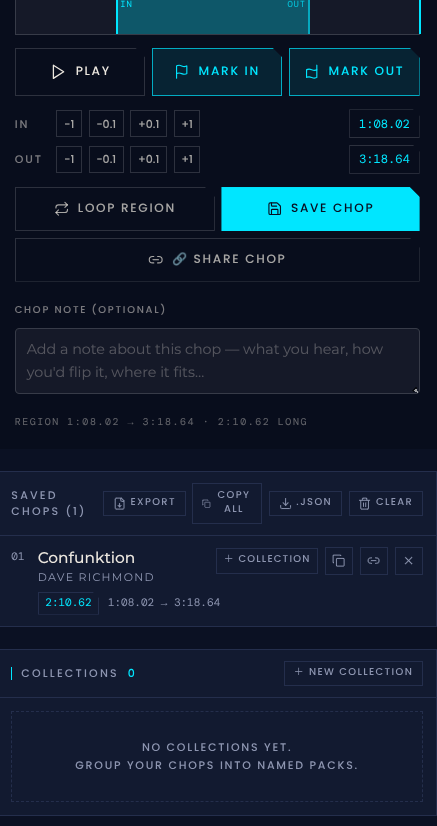
Listen through the track and find the section you want to chop. Once you hear it, pause at the start of the moment. Click Set from Playhead to mark that exact position as your chop start point. The end point is auto-set 5 seconds ahead.
💡 Tip: Enable LOOP mode to hear your region on repeat while you fine-tune the start and end points.
2
Load a Track
Click any track in the library to load it into the player. The YouTube Music embed loads instantly and the track is ready to play. Use the progress bar, skip controls, and volume slider to navigate the song.
4
Preview the Chop
Click Preview Chop to hear exactly what your sample will sound like. ChopCasa seeks to the start of your region, plays through to the end, and stops automatically. Adjust and preview as many times as you need until the chop is right.
6
Take It to Your Sampler
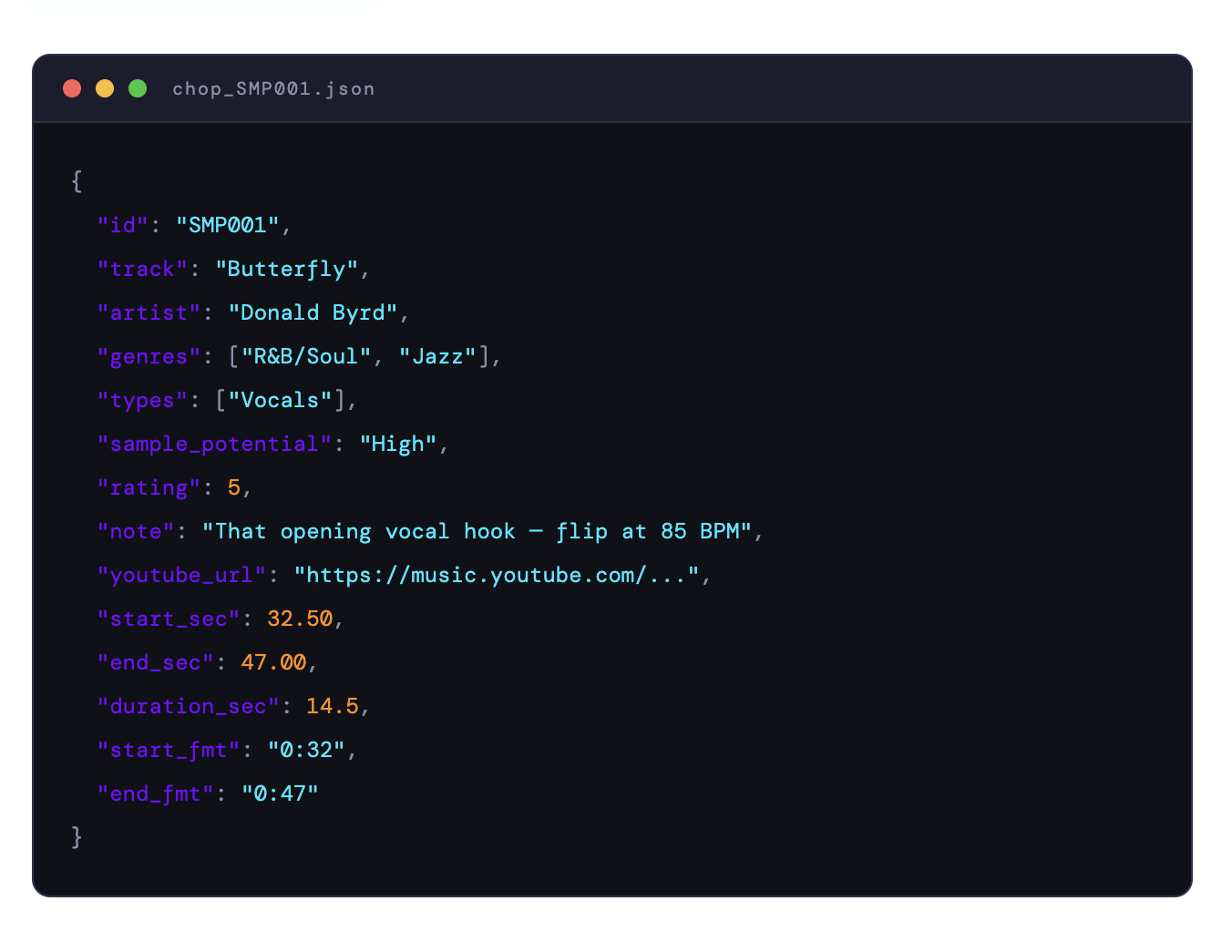
Copy the timestamp JSON for any saved chop and take it to your MPC, SP-404, Maschine, or DAW. Pull up the track, seek to the start time, and capture the region. Your chop data includes everything you need to recreate the exact moment.
track · artist · YouTube URL · start_sec · end_sec · duration_sec · start_fmt · end_fmt
5
Save Your Chop
Click Save Chop to add it to your session. Add a note about how you plan to flip it, rate it on a 1–5 scale, and organize it into a collection. Your chops persist between sessions automatically.
THE LIBRARY
Every track reviewed. Every chop rated.
The ChopCasa library is not an algorithm-curated feed. Every track has been manually reviewed for its sampling potential before it is added.
Tracks are tagged across three dimensions — Genre, Type, and Sample Potential — so you can filter with precision and find exactly the sonic material your beat needs.
GENRES
R&B/Soul
Pop
Jazz
Funk
Electronic
Italian
Orchestra
Prog
Rock
Library
Gospel
TYPE
Vocals
Instrumental
Breakbeat
500+
Total tracks in the library
3
Track types
11
Genre categories
3
Sample Potential tiers
Continuously Updated
New tracks added regularly by the NxtNow Music curatorial team
The Producer Workflow
From discovery to your sampler — in one session
ChopCasa is designed around the real workflow of a producer who samples. Every feature exists to move you faster from "I heard something" to "I'm building with it."
01
🔍
Discover
Browse and filter the curated library to find tracks with high sample potential in the genres and styles your beat needs.
02
👂
Listen
Stream the full track through the YouTube Music player. Use skip, scrub, and loop controls to navigate and find the moment.
03
✂️
Mark
Set your chop region with sample-accurate start and end points. Preview, adjust, and confirm the chop sounds exactly right.
04
🎛️
Build
Copy the timestamps and take them to your MPC, SP-404, Maschine, or DAW. Locate the moment and start flipping.
THE OUTPUT
Your chop data, ready to go
When you copy timestamps from ChopCasa, you get a clean JSON block containing everything you need to recreate the chop — on any device, in any DAW, any time.
Take it to your notes app, paste it in a spreadsheet, share it with a collaborator, or drop it straight into your workflow tool. The data is yours.
Frequently Asked Questions
-
ChopCasa is a music sampling discovery and chop-planning tool built by NxtNow Music exclusively for producers who sample. It lets you browse a curated library of 500+ tracks, mark precise chop regions, and export timestamp metadata to recreate the chop on your sampler device or DAW.
-
Every track in the ChopCasa library has been manually reviewed and rated for its sampling value. High means the track has strong, obvious chop potential — clean breaks, distinct hooks, or elements that translate easily to a sample. Medium means the track has potential but may take more creative work to flip effectively. Low means the track is in the library for discovery purposes but is harder to sample cleanly.
-
ChopCasa exports timestamps in a universal JSON format that works with any workflow. Whether you use an MPC, SP-404, Maschine, Akai Force, FL Studio, Ableton, Logic, or any other tool — the timestamp data tells you the exact start and end time of your chop in seconds, which you can apply in any environment.
-
Yes. ChopCasa generates a shareable link for any saved chop — a URL that opens ChopCasa with the track loaded and the region pre-set, ready to preview. Send it to a collaborator and they can hear exactly what you found without needing to search for it themselves.
-
The ChopCasa library is maintained and updated regularly by the NxtNow Music curatorial team. New tracks are reviewed and rated before they are added, so every addition meets the same standard as the existing catalog.
NxtNow Music Accelerator
The chop starts here
Browse the library, find the moment, mark your region, and take the timestamps to your sampler. ChopCasa is free to use for Music Accelerator members — open it now and start discovering.